
What Is Search Engine Crawling?How Search Engines Discover Content


Before your website can show up anywhere in Google, something has to find it first. That something is a crawler, and the process is called crawling. It sounds simple when you say it like that, but there’s a lot more going on under the hood than “a robot reads your page.”
I want to take this one apart piece by piece, because crawling is the stage where most technical SEO problems actually start. If your pages aren’t getting crawled properly, nothing downstream matters. Doesn’t matter how good your writing is. Doesn’t matter how fast your designer made the site load. If the crawler can’t reach a page or chokes on it halfway through, that page is invisible.
What Crawling Actually Means
Search engine crawling is the process automated bots use to discover pages across the web, fetch their content, and pass that content along so it can eventually be stored in a search engine’s index. Google describes its own version pretty plainly: download text, images, and video from pages it finds, using software that’s constantly working through a list of known and newly discovered URLs.
These bots go by a few names. Crawlers. Spiders. Bots. All the same idea: a program that visits a page, looks at what’s there, then follows whatever links it finds to the next page. Repeat that across billions of pages, nonstop, and you’ve got a search engine’s crawling operation.
Here’s a stat that puts things in perspective: Ahrefs has published research showing the overwhelming majority of pages on the web, somewhere north of 90%, get zero organic traffic from Google. A huge chunk of that isn’t because the content is bad. It’s because the page was never crawled properly, or it was crawled and then never made it into the index. Crawling isn’t a guarantee of anything. It’s just the first door you have to walk through.
Meet the Bots: Which Crawlers Are Actually Visiting Your Site
Every major search engine runs its own dedicated bot, and each one identifies itself with something called a user agent string when it requests a page from your server. If you ever look through your server logs (and you should, more on that later), this is what tells you who’s actually showing up.
| Search Engine | Bot Name | What It's For |
|---|---|---|
| Googlebot | Crawls and indexes pages for Google Search | |
| Bing | Bingbot | Crawls and indexes pages for Bing |
| DuckDuckGo | DuckDuckBot | Crawls for DuckDuckGo's own results |
| Yandex | YandexBot | Crawls for Yandex, popular in Russia |
| Baidu | Baiduspider | Crawls for Baidu, the dominant engine in China |
| Apple | Applebot | Powers Siri and Spotlight search results |
And increasingly, you’ll see a newer category showing up in your logs: AI crawlers. Names like GPTBot (OpenAI) and ClaudeBot (Anthropic) are now regular visitors to a huge chunk of the web, gathering content that may feed into AI-generated answers. If you check your robots.txt file and it hasn’t been touched since 2022, there’s a decent chance it has no instructions for these bots at all, which means they’re crawling by default unless you say otherwise.
Worth knowing too: Google doesn’t run just one crawler. There are separate bots tuned for images, video, news, ads, and mobile content. Each behaves slightly differently depending on what kind of content it’s hunting for.
How a Crawler Actually Finds Your Pages
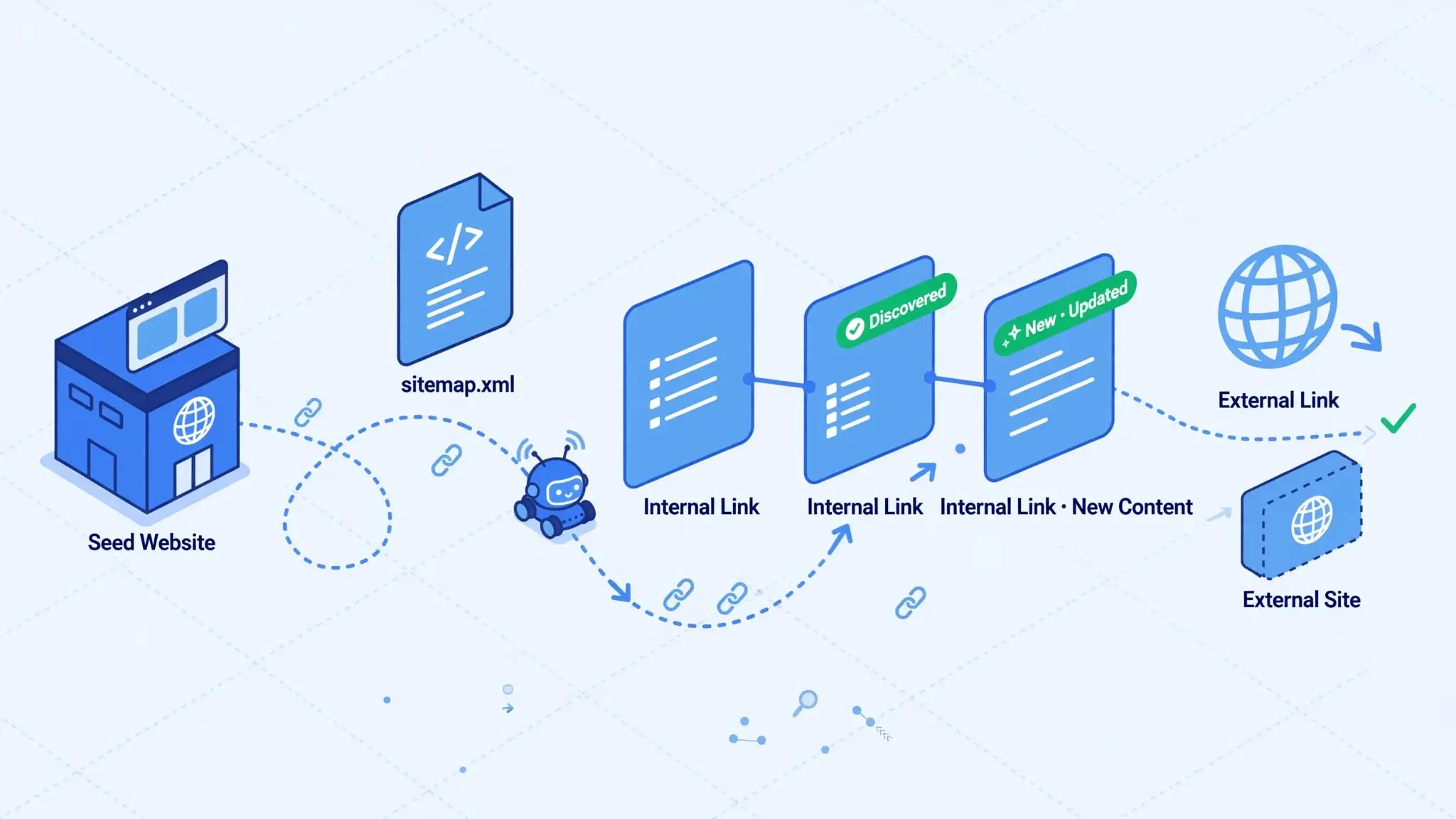
A crawler doesn’t wake up and randomly guess URLs. It works off a queue, and that queue gets filled through a small handful of methods.
Re-crawling pages it already knows about
If Google has crawled your homepage before, it’ll come back periodically to check for changes. How often depends heavily on how frequently that page tends to update and how much Google trusts the site overall.
Reading your XML sitemap
A sitemap hands the crawler a tidy list of URLs you consider important, plus some metadata about them. It’s not a command, Google can ignore parts of it, but it’s a strong hint, especially useful if your internal linking isn’t doing the job on its own.
Following links from already crawled pages
This is the backbone of the whole system. A crawler lands on a page, pulls every link out of the HTML, and adds those URLs to its to-do list for later. This works for both internal links on your own site and external links from other websites pointing to yours.
Manual submission through Search Console
You can ask Google directly to take a look at a specific URL. It speeds things along sometimes. It’s not magic, and it won’t override deeper problems with the page.
The Actual Stages a Crawler Goes Through
People often picture crawling as one single action: bot visits page, done. In reality it’s closer to a five-step pipeline, and understanding each step explains a lot of weird SEO behavior you might have noticed on your own site.
1
Discovery
This is the queue-building stage I just described. The URL gets noticed somehow, through a link, a sitemap, or a manual submission, and it gets added to the list of things worth checking out.
2
Fetching
Once a URL gets pulled from the queue, the crawler sends a request to your server, the same way a browser does when a person visits your site. Your server responds, usually with the page’s raw HTML. This is the point where server speed and uptime really matter. A server that’s slow to respond, or that returns errors under load, teaches the crawler to back off and visit less often.
3
Parsing
With the HTML in hand, the crawler starts pulling out the useful pieces: links (which get added back into the discovery queue for future crawling), references to other resources like images, CSS, and JavaScript files, and metadata like the title tag and meta description.
4
Rendering
This is the stage most beginner guides skip entirely, and it’s honestly one of the more important ones for any modern website. A huge number of sites today build their actual visible content using JavaScript rather than plain HTML. The raw HTML a crawler first grabs might be nearly empty, with the real content getting added in afterward by JavaScript running in the browser.
To deal with this, Google runs a second pass where it actually executes the JavaScript, more or less simulating what a browser would show a real visitor. This is called rendering, and it’s expensive in terms of computing resources, which means it doesn’t always happen immediately after the initial fetch. Sometimes there’s a real gap, hours or even days, between when a page gets fetched and when it actually gets rendered and properly understood.
If your important content only appears after JavaScript runs, and something goes wrong in that rendering step, Google may end up working with a half-built version of your page. This is a genuinely common cause of indexing problems on modern JavaScript-heavy sites, and it’s worth checking directly using the URL Inspection tool in Search Console, which shows you a screenshot of what Google actually rendered.
5
Storage and Handoff to Indexing
Whatever survives the parsing and rendering stages gets handed off to the indexing system, where Google decides whether the page earns a permanent spot in its database. Crawling’s job ends here. What happens next is a separate process with its own set of rules.
Crawl Budget: Why Google Doesn't Crawl Everything, Every Time
Even with Google’s enormous resources, crawling isn’t unlimited. Every site gets something close to an allowance, generally called crawl budget, made up of two separate pieces.
Crawl Rate Limit
The crawl rate limit is about not overwhelming your server. Google deliberately throttles how fast and how often it requests pages from a single site, partly out of courtesy and partly because hammering a server too hard would just slow everything down for everyone, including Google.
Crawl Demand
Crawl demand is more about interest. Even if Google technically could crawl more of your site, it might not want to. Pages that look like duplicate filter combinations, endless calendar archives, or low-value parameter variations don’t excite a crawler. Why spend resources on pages that probably don’t add anything new?
A few things noticeably affect your crawl budget:
- Site Speed
Fast, responsive servers get crawled more generously, partly because Google can fit more requests into the same amount of time without risking your site’s stability.
- Error Rates
A site throwing a lot of 500-level server errors looks unhealthy, and Google tends to pull back rather than keep hammering a struggling server.
- Popularity and Freshness
Pages that get linked to often, or that update frequently with genuinely new content, tend to earn more frequent crawl attention.
For a small site with a few dozen pages, none of this really matters; Google can crawl your whole site in a single pass without thinking twice. For large ecommerce catalogs or sites with tens of thousands of URLs, crawl budget becomes a real strategic concern, and wasting it on junk pages can mean your genuinely valuable pages get crawled less often than you’d like.
Controlling What Gets Crawled
You can’t force Google to crawl a specific page on a specific schedule, but you do have real tools for steering it.
Robots.txt
This is the very first file a well-behaved crawler checks when it arrives at your domain. It lives at yourdomain.com/robots.txt and lays out which paths are off-limits. Use it to keep crawlers away from things like internal search result pages, staging environments, or duplicate parameter-heavy URLs.
One mistake that comes up constantly: blocking your own CSS and JavaScript files through robots.txt. Doing that actively hurts you, because Google needs those files to properly render your page during that rendering stage we talked about earlier. Block them and Google might end up seeing a broken, stripped-down version of your site, which can genuinely tank how it evaluates your pages.
XML Sitemaps
Where robots.txt tells crawlers where not to go, a sitemap tells them where you’d like them to go. It’s a friendly suggestion, not a command, Google can and does ignore sitemap entries it doesn’t think are worth crawling. Still, for sites with weak internal linking or a lot of pages buried deep in the site structure, a sitemap is genuinely one of the easiest wins available.
Nofollow and Noindex: Two Different Tools That Get Mixed Up Constantly
This trips up even experienced site owners. A nofollow attribute on a link tells the crawler not to pass authority through that specific link and, depending on context, not to bother following it at all. It doesn’t stop the destination page from being crawled or indexed through some other link pointing at it.
A noindex meta tag is completely different. It doesn’t stop crawling at all, Google will still fetch the page and follow any followable links on it. What it does is tell Google: once you’ve looked at this, please don’t store it in the index. The page stays crawlable, just permanently excluded from search results.
Mixing these two up causes real problems. I’ve seen people add nofollow to internal links thinking it would keep a page out of search entirely, only to find the page indexed anyway because another site linked to it elsewhere. If your actual goal is “keep this specific page out of search results,” noindex is the tool you want, not nofollow.
What Causes Crawl Errors
A crawl error happens whenever a bot tries to reach a URL and fails for some reason. These show up clearly in the Pages report inside Google Search Console, and they generally fall into two buckets.
Site-wide issues affect everything at once: DNS problems, total server downtime, or a robots.txt file accidentally blocking your entire domain (this happens more than you’d guess, usually right after a site redesign or platform migration where someone forgets to update the file before going live).
Page-level issues are more isolated: a single broken link returning a 404, a redirect chain that loops back on itself, or a soft 404 where a page technically loads fine but contains almost no actual content, leading Google to treat it as an error anyway.
Checking Your Own Crawl Activity
If you want to see exactly how Google is treating your site right now, a few places in Search Console are worth a regular look:
Crawl Stats report (under Settings) shows you total crawl requests over time, broken down by response type and file type. A sudden spike or drop here is usually worth investigating.
Pages report shows which URLs are indexed and, more usefully, lists specific reasons for the ones that aren’t.
URL Inspection tool lets you check one specific URL, see when it was last crawled, and view the rendered screenshot Google actually captured.
Robots.txt tester confirms whether a specific path is blocked before you accidentally find out the hard way.
Server log files are the deeper version of this, since they record literally every request your server received, including ones from bots that Search Console doesn’t fully surface. For most small sites this is overkill. For larger sites trying to diagnose exactly which pages Googlebot is spending its time on, log file analysis is genuinely one of the most useful technical SEO exercises there is.
Crawling Is the Starting Line, Not the Finish Line
It’s worth repeating because it trips people up constantly: getting crawled doesn’t mean getting indexed, and getting indexed doesn’t mean ranking well. Crawling just opens the door. What happens after, whether your content gets stored, understood, and eventually placed somewhere in the results, depends on a completely separate set of decisions search engines make once they’ve actually read what you’ve published.
Get the crawling fundamentals right, clean robots.txt, a sitemap that actually reflects your real pages, solid internal linking, fast and stable server responses, and you’ve removed one of the biggest invisible barriers between your content and the people actually searching for it.