
Beginner's Guide to What Is Search Engine Ranking?

You’ve heard it a hundred times. “You need to rank on page one.” “My site isn’t ranking.” “How do I improve my ranking?”
But here’s the thing most people who use the word “ranking” every day couldn’t give you a clear explanation of what it actually means or how it works. They know they want it. They just don’t know what drives it.
This guide fixes that.
We’re going to cover what search engine ranking actually is, how Google decides which pages go where, and what you can realistically do to climb higher in results. No fluff, no vague advice, just a clear picture of how ranking works from the ground up.
One quick note before we dive in: ranking is actually the third step in how search engines work, not the first. Before any page can rank, it needs to be crawled and indexed first. If you haven’t read our guide on search engine indexing, that’s a good place to start. This article picks up where that one left off.
What Is Search Engine Ranking?
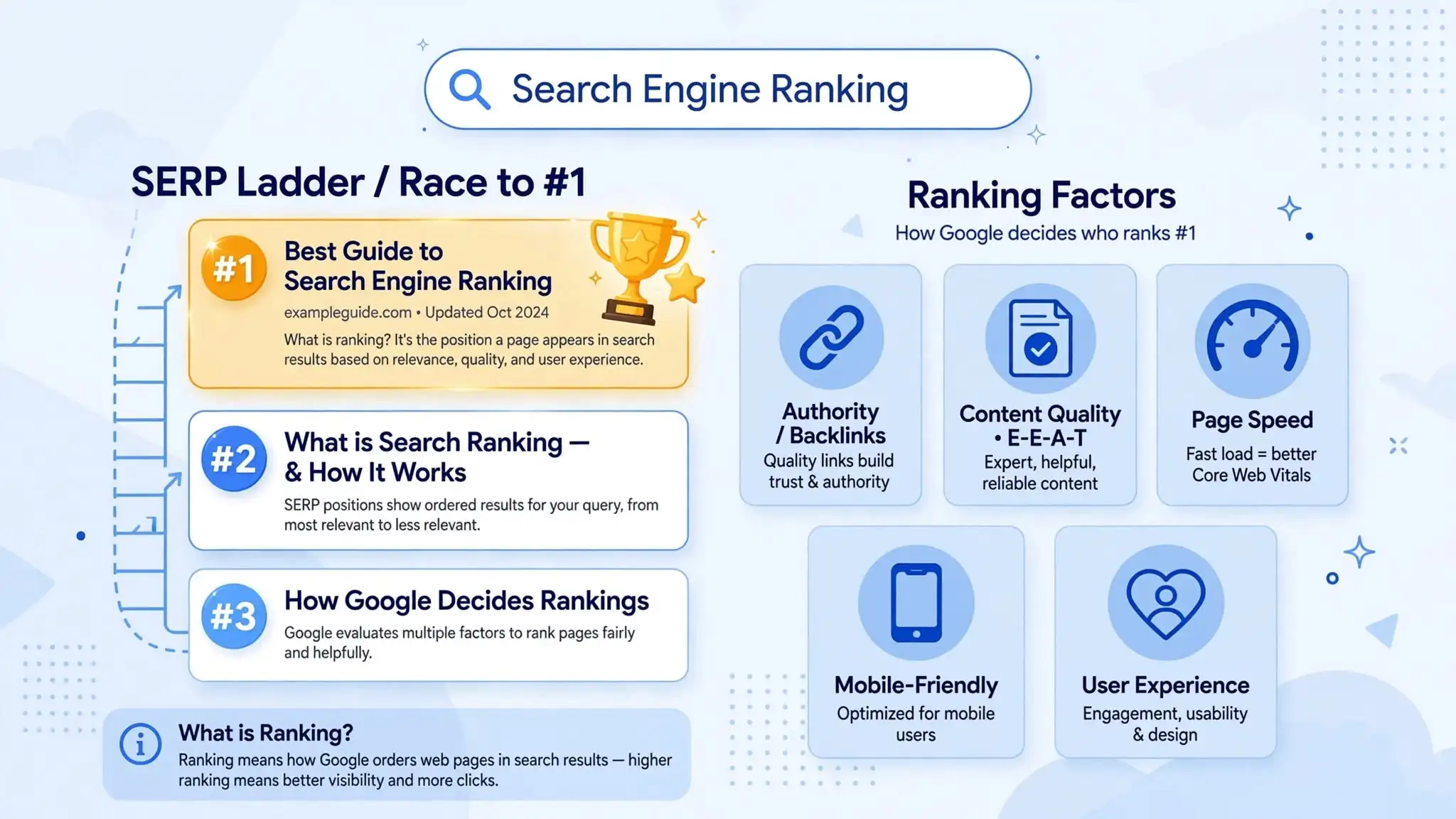
Search engine ranking refers to the position your web page holds in a search engine’s results page (SERP) for a specific query.
When someone searches for “best running shoes,” Google doesn’t flip a coin to decide which pages appear first. It goes through its index — that enormous database of pages it’s already stored — and ranks them in order from most relevant and trustworthy to least.
The page Google decides best answers that search query gets position 1. The next best gets position 2. And so on, all the way down through the pages of results.
Your website ranking is never a fixed number. It changes depending on:
- What keyword is being searched
- Who is searching (location, search history, device)
- When it's being searched
- What your competitors are doing with their own pages
So a page on your site might rank #3 for one keyword and #47 for a slightly different one. Ranking is always keyword-specific. Keep that in mind, because a lot of beginners assume “my site ranks well” means it ranks well for everything. It doesn’t work that way.
How Does Google Decide Who Ranks Where?
This is where things get genuinely interesting.
Google uses an algorithm — a complex set of rules and calculations — to evaluate every page in its index and decide how to order them for any given search query. Nobody outside of Google knows the full algorithm, and even Google’s own engineers don’t fully understand every interaction between all its parts.
What we do know is that Google has confirmed the existence of hundreds of ranking factors — signals it uses to evaluate pages. Some carry a lot of weight. Some are minor. Together, they build a picture of how good and relevant a page is.
Here are the ones that matter most.
- Relevance
- Authority
- Content Quality
- User Experience
- Page-Level Signals
Relevance — Does Your Page Match What Someone Searched For?
The most basic question Google asks is: does this page actually answer the search query?
This sounds obvious, but the way Google measures relevance has gotten very sophisticated. It’s not just about matching exact keywords anymore. Google uses a technology called natural language processing (NLP) to understand the meaning behind a search, not just the literal words.
So if someone searches “how do I make my website show up on Google,” Google understands that query is about SEO and indexing — even if the page that best answers it uses different phrasing entirely. Google is trying to match search intent, which is the underlying goal behind a search, not just the surface-level words.
This is why stuffing a keyword into your content fifty times doesn’t work anymore (and actually hurts you). Google is looking for pages that genuinely, thoroughly address what a user is trying to accomplish.
Authority — Is Your Page Trustworthy?
Relevance gets you in the conversation. Authority decides how high you go.
Google measures authority largely through backlinks — links from other websites pointing to your page. The logic goes: if a lot of reputable websites are linking to your content, your content is probably worth reading. It’s like citations in academic research. The more credible sources reference your work, the more credible your work appears.
But not all backlinks are equal. A link from a major news outlet or a respected industry publication carries far more weight than a link from a random low-traffic blog. Google evaluates the quality, relevance, and authority of the site that’s linking to you, not just the number of links.
This system is rooted in Google’s original PageRank algorithm, developed by Larry Page and Sergey Brin. The core concept — that links are votes of confidence, and votes from authoritative sources count more — still underpins how Google thinks about authority today, even though the full algorithm has evolved enormously since then.
Content Quality — Is It Actually Good?
Google has gotten remarkably good at evaluating content quality. It looks at signals like:
- Does the content cover the topic thoroughly?
- Is it written for humans or written to game a search engine?
- Does it match what users are actually looking for?
- Is it accurate, up to date, and trustworthy?
Google introduced a framework called E-E-A-T (Experience, Expertise, Authoritativeness, and Trustworthiness) as a way for its quality evaluators to assess content. While E-E-A-T isn’t a direct ranking factor you can “switch on,” the content signals it points to — real expertise, accurate information, demonstrated experience — do influence how Google’s algorithm evaluates your pages.
Thin content, recycled information, and pages that exist purely to rank rather than to help anyone tend to get filtered down in the results over time, especially after major Google algorithm updates.
User Experience — Do People Like Visiting Your Page?
Google cares about what happens after someone clicks your result. If users consistently land on your page and immediately hit the back button — a behavior called pogo-sticking — that’s a signal that your page didn’t deliver what the searcher was looking for.
On the technical side, Google uses Core Web Vitals as a direct ranking signal. These are specific measurements of your page’s user experience:
- LCP (Largest Contentful Paint) — how quickly the main content loads
- FID (First Input Delay) / INP (Interaction to Next Paint) — how fast your page responds to user interaction
- CLS (Cumulative Layout Shift) — whether elements on your page jump around while loading
A slow, clunky, unstable page is a bad experience. Google knows this and factors it into rankings, particularly in competitive niches where multiple pages have similar content quality.
Mobile-friendliness is also part of this picture. Google now uses mobile-first indexing, meaning it primarily evaluates the mobile version of your page — not the desktop version — when deciding how to rank it. If your site looks great on a laptop but falls apart on a phone, your rankings will reflect that.
Page-Level Signals — On-Page SEO
Beyond the big factors above, there are a range of on-page signals Google reads to understand what your page is about and how well it’s put together:
- Title tag
The clickable headline in search results. One of the clearest signals to Google about what a page covers.
- Meta description
It doesn’t directly affect rankings, but influences click-through rate, which matters.
- Headings (H1, H2, H3)
They help Google understand the structure and topics covered on the page.
- URL structure
The clean, descriptive URLs are easier for both users and search engines to understand.
- Image alt text
It helps Google understand what images depict, and matters for image search.
- Internal links
They signal to Google which pages on your site are related and important.
None of these alone will make or break your rankings. But together, they help Google build a clear picture of what your page is about and how well it serves the user.
What Is a SERP and What Does It Look Like?
SERP stands for Search Engine Results Page. It’s the page you see after you type something into Google.
The modern SERP isn’t just a simple numbered list of ten blue links anymore. Depending on what you search, you might see:
Organic results
the traditional ranked web page listings
People Also Ask
expandable questions related to your search
Local pack
a map and list of nearby businesses for location-based searches
Featured snippets
a box at the top that directly answers the query (sometimes called “position zero”)
Image or video carousels
visual results embedded in the page
Knowledge panels
information cards about well-known entities (people, places, organizations)
Understanding what type of SERP shows up for your target keywords matters because it affects your strategy. If the top of the page is dominated by a featured snippet and a People Also Ask box, organic position #1 might actually get less traffic than you’d expect. If it’s a local pack, you need to optimize your Google Business Profile, not just your website.
Where Does Your Site Currently Stand?
Before trying to improve your rankings, you need to know where you actually are. A few ways to check
How to Actually Improve Your Search Engine Ranking
Now for the part most people came here for. Here’s what genuinely moves the needle.
1
Start With the Right Keywords
You can’t rank for everything, and trying to rank for the most competitive keywords right out of the gate is a losing battle. A brand new site trying to rank for “running shoes” is going up against Nike, REI, and Runner’s World. That’s not a fair fight.
Instead, focus on long-tail keywords — more specific, lower-competition phrases that still have real search intent behind them. “Best running shoes for flat feet under $100” is harder to rank for than “running shoes,” and it has lower search volume, but it’s actually achievable for a newer site. And the people searching it are usually closer to taking an action.
As your site grows in authority, you can target more competitive terms. But starting narrow and specific is almost always the smarter play.
2
Write Content That Fully Covers the Topic
Surface-level content doesn’t rank well anymore. When Google evaluates a page for a given query, it’s looking at whether the page genuinely covers the topic — not just mentions the keyword.
Look at what pages currently rank in the top 5 for your target keyword. What do they cover? What questions do they answer? What subtopics come up? Your content should cover at least as much ground, ideally more or better.
This isn’t about word count. A 600-word page that perfectly answers a specific question can outrank a 3,000-word page that waffles around the topic. Length matters when depth is needed. It doesn’t matter for its own sake.
3
Earn Backlinks From Real, Relevant Sites
Backlinks remain one of the strongest ranking signals Google uses. There’s no shortcut here — the backlinks that actually move rankings come from real websites with real audiences in relevant topics.
The most sustainable ways to earn backlinks:
Create genuinely linkable content
Original research, detailed guides, useful tools, and data-driven articles attract links naturally over time because other writers and website owners reference them.
Guest posting
Writing articles for other websites in your niche in exchange for a link back to your site. When done with real quality and genuine relevance (not spam), this still works well.
Digital PR
Getting your site, your data, or your expertise mentioned in news articles, industry publications, or podcasts. These links carry significant weight.
Broken link building
Finding broken links on other sites that used to point to content similar to yours, and suggesting your page as a replacement.
What doesn’t work — and can actually harm your rankings — is buying links in bulk, participating in link schemes, or getting links from irrelevant or low-quality sites. Google’s Penguin algorithm update specifically targets manipulative link building, and the penalties can be severe.
4
Fix Your Technical SEO
All the great content in the world won’t rank if your site has fundamental technical problems. The most common technical issues that drag rankings down:
Slow page speed. Use Google’s PageSpeed Insights to check your Core Web Vitals scores. Common fixes include compressing images, using a caching plugin, and upgrading your hosting.
Not mobile-friendly. Check how your site looks and functions on a phone. Google’s Mobile-Friendly Test tool will tell you if there are issues.
Crawl errors. Pages returning 404 errors, redirect chains, or broken internal links all waste crawl budget and create a poor user experience.
Duplicate content. Having the same content accessible from multiple URLs confuses Google about which version to rank and can dilute your authority. Use canonical tags to resolve this.
Missing or poorly written title tags. Every page should have a unique, descriptive title tag that includes the target keyword naturally.
5
Improve Your Click-Through Rate
Your click-through rate (CTR) — how often people click your result when they see it in the SERP — is something Google watches. A page sitting at position 4 that gets clicked more than position 1 sends a signal that maybe position 4 deserves to be higher.
Two things primarily influence CTR:
Title tag — Make it compelling and specific. Include the keyword, but also give people a reason to click. “What Is Search Engine Ranking?” is fine. “What Is Search Engine Ranking? (And Why Your Site Is Invisible Without It)” is better.
Meta description — Doesn’t directly affect rankings, but a well-written meta description acts like ad copy. It tells the searcher exactly what they’ll get if they click. Don’t waste it by just restating the title.
6
Be Patient and Consistent
This is the part nobody wants to hear but everybody needs to: SEO takes time.
A brand new page on a brand new site can take months to rank, even if everything is done right. An established site with real authority can rank new content in days. Where you fall on that spectrum depends on how much trust Google has built up for your domain.
The sites that win long-term in search are the ones that publish good content consistently, build links steadily over time, keep their technical foundations clean, and don’t chase algorithm shortcuts. It’s not exciting. But it works.
Common Ranking Myths Worth Clearing Up
I need to update my page every day to rank
No. Google doesn’t reward frequency for its own sake. Freshness matters for topics where recency is important (news, current events) but not for evergreen content. Update your pages when the information actually changes, not just to show activity.
Position #1 always gets the most traffic
Not always. Featured snippets, ads, and SERP features appear above organic result #1 for many queries. And for some informational queries, a lot of people get their answer from the snippet without ever clicking. The relationship between position and traffic is more complicated than it used to be.
More keywords = better rankings
Keyword stuffing is a penalty waiting to happen. Use your target keyword naturally where it fits. Google is smart enough to understand related terms and context — you don’t need to repeat the same phrase twenty times.
Social media shares directly improve rankings
Google has stated that social signals are not a direct ranking factor. That said, content that gets shared tends to attract more backlinks and traffic over time, which do affect rankings. So social media helps indirectly, not directly.
A Practical Checklist for Better Rankings
Use this as a starting point when evaluating any page you want to rank:
- Does the page target a specific keyword with real search volume?
- Does the content fully cover the topic and match search intent?
- Is the title tag clear, keyword-inclusive, and compelling to click?
- Is the meta description written to encourage clicks?
- Are headings used logically to structure the content?
- Is the page fast and mobile-friendly?
- Does the page have internal links from other relevant pages on your site?
- Are there quality backlinks pointing to this page or the domain?
- Is there any duplicate content or canonicalization issue to resolve?
- Are there any crawl errors or technical issues flagged in Search Console?
Wrapping Up
Search engine ranking isn’t magic, and it isn’t a mystery — it’s a system. Google is trying to solve a very specific problem: for any given search, surface the most relevant, trustworthy, and user-friendly page available. Everything in its algorithm is pointed at that goal.
Your job as a website owner is to make it easy for Google to see that your page is the best answer for the queries you’re targeting. That means relevant content, real authority, a good user experience, and clean technical foundations. None of it is complicated in theory. The hard part is doing it consistently over time.
Get the basics right, stay patient, and the rankings follow. It’s slower than anyone wants it to be — but it’s also more durable than any shortcut you’ll find.